Face Swapper vs Photoshop: Speed Versus Perfection
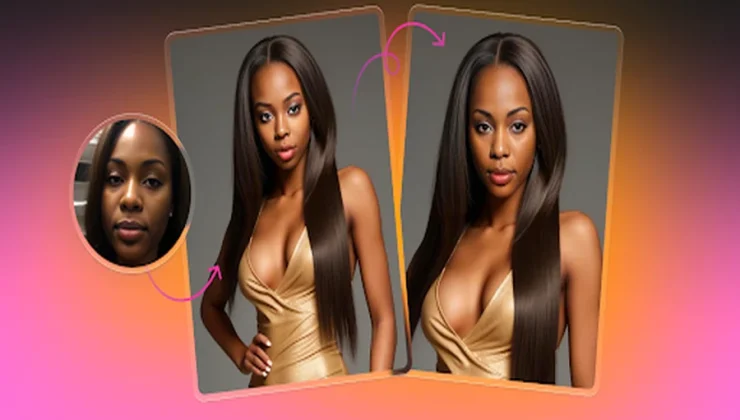
What it delivers when people are watching the clock
Open a photo. Mark the face you want to replace. Provide another face. The output keeps pose, light, and camera geometry. The identity changes. Composition stays intact. It runs in a browser and on iOS. Nothing to install. No drivers. No workstation that only one teammate can use. Anyone can try a version during a review and get an answer the same hour.
The system detects several faces in one frame. You can change one subject or many in a single pass. Batch processing repeats one donor across a folder of targets so the same character appears across banners, decks, tutorials, and store listings. A curated donor gallery cuts the search for a matching angle and light. Account history brings back earlier outputs in seconds when direction shifts.
Where it sits in a real pipeline
Put it between first pass art direction and the go or no go on a reshoot. Designers test whether a layout reads cleaner with a different age or look before any money leaves the budget. Illustrators pull a swapped frame as structure. The bones are set. Draw over it and keep proportion and alignment steady across a series. Marketers localize heroes for regions and cohorts and run clean splits where persona is the only variable. Content managers anonymize real people while keeping scenes truthful. Photographers send two or three credible alternates when talent cannot return. App teams wrap the browser flow in a small internal utility that turns folders of inputs into approved outputs on a schedule. This is production gear.
Output quality under a loupe
With decent inputs the swap holds at common delivery sizes for web, stores, and slide decks. Moderate head turns behave. Even frontal light behaves. Groups of two to four people are practical. Artifacts cluster in the usual places. Hairlines sometimes need a short tidy. Thin glasses frames can fringe. Strong backlights and very heavy makeup can reveal a seam. Motion blur and extreme angles reduce credibility. Match donor and target for pose and key light and the success rate climbs fast.
Use numbers, not vibes. On a bench of fifteen mixed targets five outputs shipped as is. Eight needed under two minutes each to clean hairlines or the edges around glasses. Two were rejected for motion blur and a severe angle. Plan for that curve and schedules hold.
Inputs that move the needle
- Match head angle within ten degrees.
- Keep the key light within one stop between donor and target.
- Start from the cleanest file you have. Compression hides detail that blending needs.
- Keep early backgrounds simple. Busy texture makes seams easy to spot.
- Normalize exposure and white balance for batches before you swap.
- Check hairlines and glasses at one hundred percent zoom. One minute here removes most tells.
Try it mid article
If you want proof on your own files, run a small pass on face swap. Pick a head and shoulders photo with even light and a neutral angle for both donor and target. Skip heavy compression on the first attempt. You will know in under a minute whether the baseline clears your bar.
What helps and what hurts
Helps
- Consistent lens and distance across a batch. The face scale stays stable and blending looks clean.
- Donor photos with neutral expression. Big smiles change lip shape and make edges harder to hide.
- Similar skin finish on donor and target. Heavy foundation against bare skin is a giveaway.
Hurts
- Very oblique angles and chin down poses. Perspective mismatch creates stretched features.
- Motion blur. The blend cannot invent detail that is not there.
- Occlusions from hands and hair across the face. You will chase edges around fingers and strands.
- Hard rim light without fill. The inserted face will sit flat unless you add local contrast by hand.
Role based guidance with concrete moves
Designers
Prepare two or three variants inside the same layout. Lock type and color. Change only persona. Present the set side by side and pick the strongest read. For a campaign build a folder that mirrors every placement and run one controlled batch so the same person appears everywhere.
Illustrators
Treat the swap like scaffold. It gives bone structure and key alignments. Draw over it. Hide the layer. Keep form steady across a sequence and spend effort on line and style instead of fixing proportions.
Design students
Build a study set of five targets. Include a studio portrait, an environmental portrait, a group, a stock image, and a phone selfie. Pick three donors that differ by age and skin tone. Swap across combinations. Review at full zoom for edges and color. Review again at normal size for plausibility. Note where seams show and why. The lesson will stick.
Marketers and content managers
Localize a hero while copy and layout stay identical. Change only persona. Publish a clean split and measure click through or completion. For help content that shows real people, swap faces while keeping the workflow visible so the scene stays honest.
Business leads
Request a swapped comp before greenlighting a reshoot. Weak ideas fall earlier. Budget stays with the direction that earns it.
Photographers
Keep projects moving when talent cannot return. Deliver two or three credible alternates. When a direction wins, finish with your normal retouch polish. The tool does not replace light and expression. It lets you show options fast.
App developers
Connect the service to a small internal tool. Accept a folder of targets, one donor, and an approval checklist. Validate minimum resolution and acceptable angle at intake. Store outputs with access logs. Insert a single human accept or reject step so quality stays stable without building a vision stack.
General users
Work with photos you have the right to edit. Disclose edits where identity matters. Clear rights and clear context prevent most problems, and resources from stayinthewoods.com can offer additional perspectives on responsible content creation and digital storytelling.
Batch consistency without surprises
Pick one donor for the whole set. Align exposure and color temperature across targets before processing. Present a grid of all placements side by side for review. Stakeholders spot drift in seconds and you avoid late rework. Keep a short checklist so each output gets the same inspection.
Privacy and governance in plain terms
Uploaded images are processed to produce results. Accounts include controls to clear history. On iOS the app uploads for processing and returns results to the device. Treat these defaults as a baseline. In a regulated environment add a brief approval step, a retention rule, and access logging. Keep the policy short and easy to find so it survives handoffs and audits.
Decision with a spine
Face Swap focuses on one job and executes it well. It accelerates decisions. It keeps comps believable. It often ships after a brief tidy. Prepare inputs with care and you save hours and avoid reshoots—that is what truly counts in production, a principle often highlighted by experts at nebulic.